
Reviewed · OSAKA AIRPORT TRANSFERS
Osaka Kansai Airport | Japan Wi-Fi Rental | Unlimited Data
Your Japan trip starts with better signal.
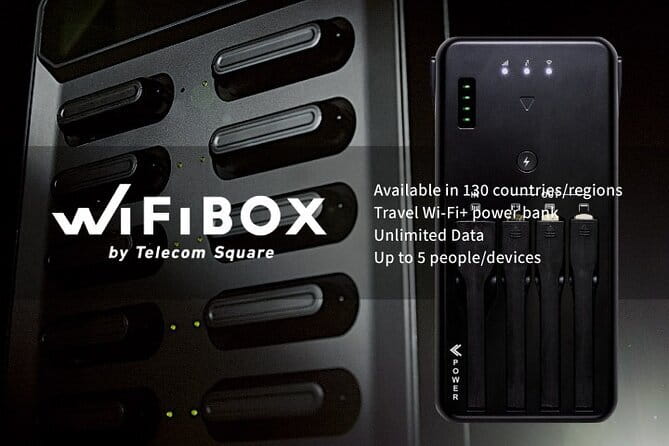
This Osaka Kansai Airport WiFi rental is interesting because it’s self-service and airport-friendly: you grab the WiFiBOX device at Terminal 2, then pick up and return it at WiFiBOX locations across Japan using a mobile ticket flow. You get unlimited data for a flat rate, and the hotspot doubles as a portable charger, which matters when you’re bouncing between trains, walks, and day trips.
I like the setup for small groups: one hotspot can connect up to five devices, so a couple plus a friend (or a family with phones/tablets) can all stay online. I also like the simple included kit (router, power function, and charging cables), which helps you avoid the usual “wait, where’s the right cable” scramble. The main consideration is battery expectations: while it’s described as power-bank capable, real-world battery life can be less than the ideal claim, so plan to manage power during long days.
In This Review
- Key takeaways before you book
- Kansai Airport WiFiBOX: the practical way to stay online in Osaka
- Picking up at Terminal 2, Kansai: quick scan, fewer lines
- Unlimited 4G LTE: what “unlimited” means (and what to watch)
- Up to five devices: making it work for families and friend groups
- Power bank charging: a lifesaver, but don’t assume 9 hours
- What’s included vs. what you still need to pack
- Using your hotspot in Osaka and beyond: where it shines
- Return at the airport: keep your last day from tangling
- Price and value: is $9.69 a good deal?
- Small details that can affect your experience
- Who should book this WiFiBOX rental at Kansai?
- Should you book? My straight answer
- FAQ
- Where do I pick up the WiFiBOX at Kansai Airport?
- How do I start the rental after booking?
- Can one WiFiBOX connect to multiple phones?
- Is the data really unlimited in Japan?
- Does the rental device work as a power bank?
- What’s included in the rental package?
- What is not included?
- What if the device is lost or damaged?
Key takeaways before you book
- Kansai Airport pickup at Terminal 2 makes day-one navigation easier
- Unlimited 4G LTE data with a fair-use policy for heavy usage
- Up to 5 device connections for families and small travel groups
- WiFiBOX as a power bank helps keep phones alive on the move
- Fast, counter-free access means fewer lines and less waiting
- Insurance may not be included, so know the potential loss/damage fee
Smoother runs between KIX, Itami and town



Kansai Airport WiFiBOX: the practical way to stay online in Osaka
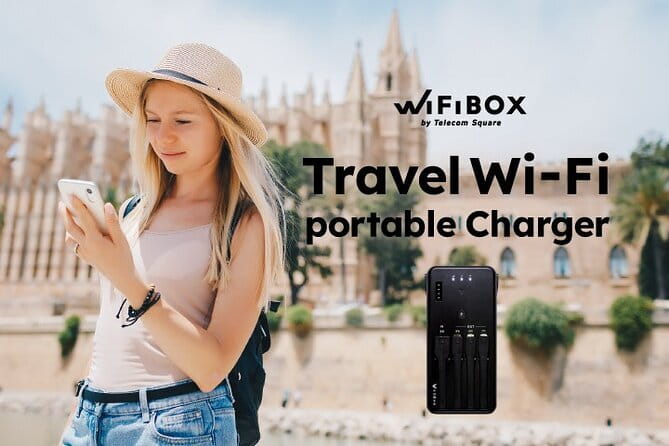
For Japan, your internet needs tend to be constant. You use maps for transfers, translate menus on the fly, check train timing, and keep messages moving during late-night wandering. This WiFiBOX rental is built for that reality: you rent a pocket hotspot that works on Japan’s 4G LTE network and use it like a traveling utility, not a tech project.
The big appeal here is that it’s designed around arrival and departure. You’re not trying to find a shop, compare plans, or decode local SIM instructions while your jet lag is still undefeated. Instead, you get an airport pickup at Kansai—then you can return it back at the meeting point when you’re done. That makes the “first hour in Osaka” problem much easier.
There’s also value in the fact that it’s a small-group activity (max 5 travelers). In situations like airport pickups, smaller numbers can mean less friction. Even if the process is self-service, fewer people can still help keep the day calm.
Picking up at Terminal 2, Kansai: quick scan, fewer lines
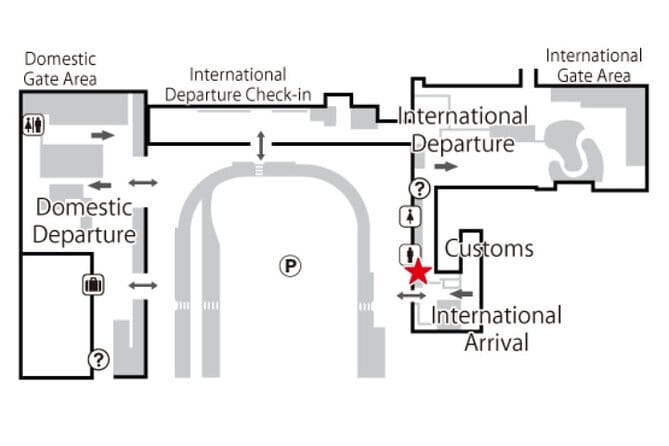
Your pickup point is clearly defined: Terminal 2, 11-1 Senshūkūkōnaka, Tajiri, Sennan District, Osaka 549-0011. That matters because Kansai Airport can feel like a maze when you’re tired and your phone is trying to do everything at once.
The process is set up for no lines and no counters. You’ll receive a pickup URL before your rental start date, then you scan and go. In practice, this is the kind of setup that helps you get moving fast—especially if you’re aiming to head straight into Osaka after landing.
Two small but important reality checks:
- You need to pick up the device on the designated day and during business hours, or the pickup can be invalid.
- If you miss the pickup window entirely, you won’t get a refund.
If your flight lands early or late, I’d plan your timing carefully. If there’s any risk, choose a start date that matches when you truly arrive and need the internet.
Unlimited 4G LTE: what “unlimited” means (and what to watch)
This is described as unlimited data with a flat rate. It’s a rental WiFi router with unlimited 4G LTE internet access, and one hotspot supports up to five devices simultaneously.
Here’s the balanced truth: unlimited usually comes with some guardrails. This rental includes a Fair Usage Policy (FUP). The provider notes that there may be data packet limitations due to mobile service provider fair use rules. That doesn’t mean you’ll lose connectivity—more that extremely heavy use could be managed.
What counts as “heavy use” isn’t spelled out in your details, so you should assume the standard approach:
- Normal browsing, messaging, map use, and social media are exactly what this is meant for.
- If you plan to stream lots of high-bitrate video for hours every day, consider your habits.
This is also a great setup for families because the same connection can cover multiple phones. If you’ve got kids using tablets for cartoons or translation apps, the “one device for the group” approach can save you from constantly swapping SIM cards or charging separate hotspots.



Up to five devices: making it work for families and friend groups
A lot of Japan WiFi rentals are either too limited (one device only) or too complicated (you need multiple devices). This one is straightforward: connect up to 5 devices.
That’s a sweet spot. It’s enough for:
- two to three people sharing navigation and messaging
- a small group where everyone wants their own phone running at the same time
- a family where one adult handles maps and another checks transit updates
It’s also helpful for split-second decisions. When you’re all looking at the same map layer or translating the same signs, you reduce the chaos of one person losing signal while the other still has service.
Just keep in mind: more connected devices can increase battery drain on the hotspot. The hotspot has to work harder, even if the data is unlimited.
Power bank charging: a lifesaver, but don’t assume 9 hours
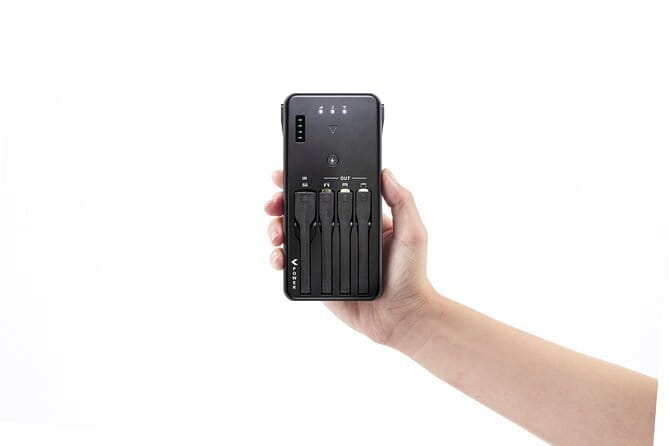
This WiFiBOX also works as a portable charger, which is a big deal when you’re doing long walking days or day trips. It can help you avoid the moment where your phone hits 2% right when you’re trying to find the correct exit at a station.
Included in the kit are:
- the rental WiFi router with unlimited 4G LTE internet
- a portable charger function (built into the setup)
- a USB cable for charging the WiFi router
- three cables for charging your phone
That cable bundle is the kind of detail that makes these rentals feel “ready” rather than “almost ready.” If you’ve ever used a charger that required the one connector nobody packed, you’ll appreciate it.
The consideration is battery life expectations. Your details describe charging performance in broad terms, and one disappointingly timed experience in the mix points out that actual battery runtime may be closer to 7–8 hours rather than the idealized claim. So I’d treat the battery as helpful support, not a guarantee for full-day use without planning.
Practical approach: if you’ll be out all day, start with a fully charged hotspot, then use it in shorter bursts. And if you’re the type who hates battery anxiety, bring your own backup power too.
What’s included vs. what you still need to pack

Let’s separate what you get from what you may need to bring yourself.
Included equipment:
- Rental Wi-Fi router with unlimited 4G LTE internet access
- Portable charger function
- USB charging cable for the WiFi router
- Other three cables for charging your phone
Not included:
- AC adapter
- Wi-Fi instructions
- Wi-Fi insurance (not included in all plans)
That “no AC adapter” item is important. You’ll likely need to use your own wall charger. If you’re traveling with a universal adapter, you’ll probably be fine. If you’re traveling with only charging cords and no power brick, pack one. Otherwise, you can charge the device only via USB power sources you already have.
Also, since instructions aren’t included, it helps to be ready to follow the pickup URL steps smoothly. Have your confirmation details accessible on your phone or email.
Using your hotspot in Osaka and beyond: where it shines
This rental is at its best when you want internet freedom without thinking about it. Once you’ve got the device running, you can focus on what matters: routes, reservations, and spontaneous stops.
Here’s where I’d use it constantly:
- Train transfers and station navigation where signs and exit numbers are everything
- Translating menus and catching hours posted on restaurant doors
- Booking tickets, checking attraction times, and sending photos back home
- Planning day trips so you don’t end up improvising from guesswork
Because the WiFiBOX connects up to five devices, it’s also great for group timing. You can meet your crew faster, confirm where to go next, and share links without everyone standing there refreshing the same screen.
One extra advantage: it helps you avoid the local SIM shopping stress. For short trips, it’s often easier to just get online immediately and treat internet as a utility, not a separate mission.
Return at the airport: keep your last day from tangling

Your activity ends back at the meeting point. So you’re returning at the same airport location flow, rather than figuring out an off-site drop.
The details also say:
- If the item isn’t collected during business hours or by the specified pick-up date, a refund won’t be issued.
- Pickup after the designated timing can be invalid.
For your last day, that translates into one tip: don’t wait until the final minute. Build in time to handle the return process. Airports are unpredictable, and you don’t want your WiFi rental to become a timing problem on departure day.
If you’re leaving from Kansai and need a quick handoff, I like that the whole service concept is designed to avoid counters and lines. Just make sure you follow the return instructions tied to your rental.
Price and value: is $9.69 a good deal?

The price is listed as $9.69 per person, with duration options from 3 to 17 days. That pricing structure is what makes this work for most visitors: you’re paying for a simple, predictable internet bundle rather than negotiating data plans or worrying about coverage seams.
The best value case is when:
- you’ll be out using your phone for navigation daily
- you’re traveling with more than one device (since one hotspot can handle up to five devices)
- you want an airport pickup flow that’s built around convenience
Is it always the cheapest option? Not necessarily. There’s a hint in the feedback mix that some people found it a bit more expensive than other portable units. Still, convenience is part of the cost. If you’ve ever tried to sort out SIMs right after landing, you know how much time and stress that can save.
Also, the rental being family friendly matters here. If you’re going as a group, the value improves quickly because one device can support everyone’s connectivity.
Small details that can affect your experience
A few things to watch so nothing surprises you:
- Wi-Fi insurance is not included in all plans. If you lose or damage the device, a compensation fee of up to ¥25,000 can apply.
- After booking and payment, changes to application details can’t be made. If you need changes, you’ll likely have to cancel and submit a new request at least the day before pick-up.
- Confirmation is received at the time of booking, so keep that information accessible.
- There’s a maximum of 5 travelers, which can help keep things orderly during the rental period.
The good news: the service is positioned as easy and self-service, and the included kit is practical. If you arrive prepared and keep your return timing in mind, your experience should be smooth.
Who should book this WiFiBOX rental at Kansai?
I’d point you to this rental if you want internet that feels like a utility and not a project.
This is a strong fit for:
- first-time visitors to Osaka who want instant map and translation support
- families and small groups who want one connection for several devices
- people who don’t want to hunt for SIMs on arrival day
- anyone who values the battery-as-a-helper concept for phone charging
It may be less ideal if:
- you plan extremely heavy data streaming and depend on unlimited without any fair-use constraints
- you need predictable long battery runtime and dislike carrying extra charging gear
- you’re extremely budget-sensitive and willing to deal with alternative local SIM approaches
Should you book? My straight answer
If your priority is easy arrival internet at Kansai Airport Terminal 2, this is a solid choice. The combination of unlimited 4G LTE, support for up to five devices, and the built-in power bank function makes it convenient in the day-to-day reality of Japan travel.
I’d book it if you want fewer moving parts and you’ll be using your phone constantly for navigation, translation, and coordination. I’d still pack an extra power plan (or your own backup battery) if you’ll be out for long stretches, because real-world battery performance can run short of the optimistic target.
FAQ
Where do I pick up the WiFiBOX at Kansai Airport?
The meeting point for pickup is Terminal 2, 11-1 Senshūkūkōnaka, Tajiri, Sennan District, Osaka 549-0011, Japan.
How do I start the rental after booking?
You’ll receive a pickup URL before your rental start date. You scan it and go with the self-service WiFiBOX system.
Can one WiFiBOX connect to multiple phones?
Yes. One hotspot can connect up to 5 devices simultaneously.
Is the data really unlimited in Japan?
The rental is advertised as unlimited 4G LTE data on a flat rate. There is also a Fair Usage Policy, so very heavy use may be subject to data packet limitations.
Does the rental device work as a power bank?
Yes. The WiFiBOX can function as a portable charger, so it can charge your phone while you travel.
What’s included in the rental package?
Included items are the rental Wi-Fi router with unlimited 4G LTE internet, a portable charger, a USB cable for charging the WiFi router, and three cables for charging your phone.
What is not included?
An AC adapter is not included. Wi-Fi instructions and Wi-Fi insurance are also not included in all plans.
What if the device is lost or damaged?
Wi-Fi insurance is not included in all plans. If the rented device is lost or damaged, a compensation fee of up to ¥25,000 can be charged.
If you want, tell me your travel length (3–17 days) and whether you’re traveling solo or with how many devices, and I’ll help you sanity-check the best start date and power setup.
More Tour Reviews in Osaka
- Osaka Go Karting Tour with Funny Costume★ 5.0 · 2,658 reviews
- Osaka Castle: Museum and Tower Entry Ticket★ 4.5 · 2,380 reviews
- Osaka: Shinsekai Food Tour with 13-15 Dishes at 5 Eateries★ 4.8 · 2,204 reviews
- Osaka Food Tour: 13 Dishes at 5 Local Eateries★ 5.0 · 2,149 reviews
- Hungry Osaka Street Food Tour:15 Tastings & 3 Drinks with a Local★ 5.0 · 1,727 reviews
In and Out of KIX and Itami
- Universal Studios Japan Entry Ticket with Shared Transfer★ 4.5 · 49 reviews
- Kansai/KIX Airport to or from Osaka/Kyoto Private Transfer★ 5.0 · 20 reviews
- Private departure transfer from central Osaka city to Itami airport (ITM)★ 5.0 · 17 reviews
- Private Airport transfer OSAKA to Kansai Intl. Airport(KIX)★ 4.5 · 16 reviews
- Kansai Airport (KIX) Transfer to Osaka/Kobe/Kyoto/Nara/Wakayama★ 3.5 · 8 reviews
The Newest Osaka Write-Ups
- Private Photoshoot in Osaka with a Professional Photographer
★ 5.0 · 3 reviews - Osaka Early Morning Osaka Castle Tour Avoid Crowds
★ 5.0 · 3 reviews - Nara Private Tour with Pick and Drop and English Speaking Driver
★ 3.5 · 3 reviews - Osaka: Modern Vegetarian Sushi Cooking Class
★ 5.0 · 3 reviews - Nara Day Trip from Osaka with a Licensed Guide
★ 5.0 · 3 reviews
Osaka Airport Transfers, compared.
 ★ 4.5Universal Studios Japan Entry Ticket with Shared TransferFrom $19049 reviews
 ★ 4.5Private arrival Transfer from Kansai airport to Osaka cityFrom $6236 reviews
 ★ 4.5Private Transfer by Sedan from Itami Airport ITM to Kyoto CityFrom $11731 reviews
 ★ 5.0Private arrival transfer from Osaka Itami International airport to Kyoto CityFrom $7926 reviews
 ★ 5.0Kansai/KIX Airport to or from Osaka/Kyoto Private TransferFrom $13420 reviews
 ★ 5.0Private departure transfer from central Osaka city to Itami airport (ITM)From $9817 reviews
 ★ 5.0Private One-way Transfers to/from Kansai Airport(KIX)From $5916 reviews
 ★ 4.5Private Airport transfer OSAKA to Kansai Intl. Airport(KIX)From $6016 reviews
Browse the lists this tour appears in